

More reliable than Telegram: using blockchain for messaging
Test messages inside the blockchain are increasingly being used for communication. We explain how to join the new trend

25.04.2025
948
4 min
1
The ability to exchange text messages on the blockchain has saved two projects in the last couple of weeks alone: the KiloEx exchange and the zkSync protocol. The developers sent messages to hackers on the Ethereum network and offered a deal where the hackers would return 90% of the stolen assets and keep 10% as a reward. And it worked. GetBlock AML Research explains how to send and receive text messages on the blockchain.
Why is this possible
Blockchain is a secure distributed ledger that stores information. Therefore, text user data can be added to transactions in addition to technical information about transfers. Because of the architecture, the data must be represented as a 16-digit code (HEX).
A text message was contained in the first transaction, which was conducted by the mythical Satoshi Nakamoto on January 3, 2009. The message contained the headline from The Times reflecting the dire state of the banking system: “The Times 03/Jan/2009 Chancellor on brink of second bailout for banks”.

The first message in bitcoin’s genesis block
How to send a message on the bitcoin blockchain
The integration of user data into bitcoin transactions is done using the OP_RETURN method. It can be used to add a text message weighing no more than 80 bytes. Just like technical data, a text message sent using the OP_RETURN method will be stored on the blockchain forever.
To send a message on the blockchain, you must first convert the text to hexadecimal code. This can be done using free services on the internet. A single transaction can contain a maximum of 160 characters (80 bytes). To transmit a longer message, it can be split into several transactions.
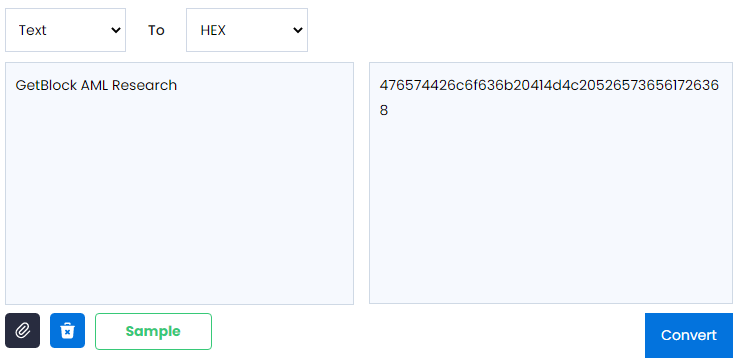
Converting the text “GetBlock AML Research” into a 16-digit code
The next step is to find a wallet that supports working with the OP_RETURN method, for example, imToken. In the transaction window, open advanced settings (the “Advanced” button), enter the 16-digit code in the OP_RETURN field, and confirm the input. Please note that sending a message is just like a regular transaction, it requires payment of a fee.
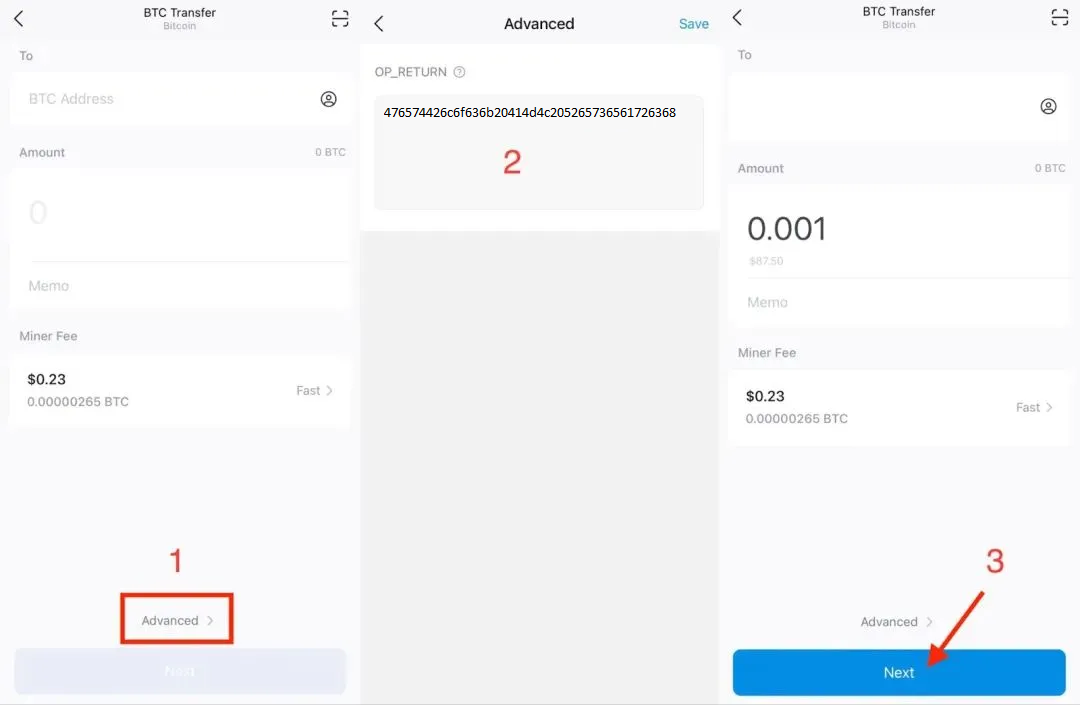
Sending a message using imToken
You can view the sent message using the blockchain explorer. To do this, you need to enter the transaction ID in it.
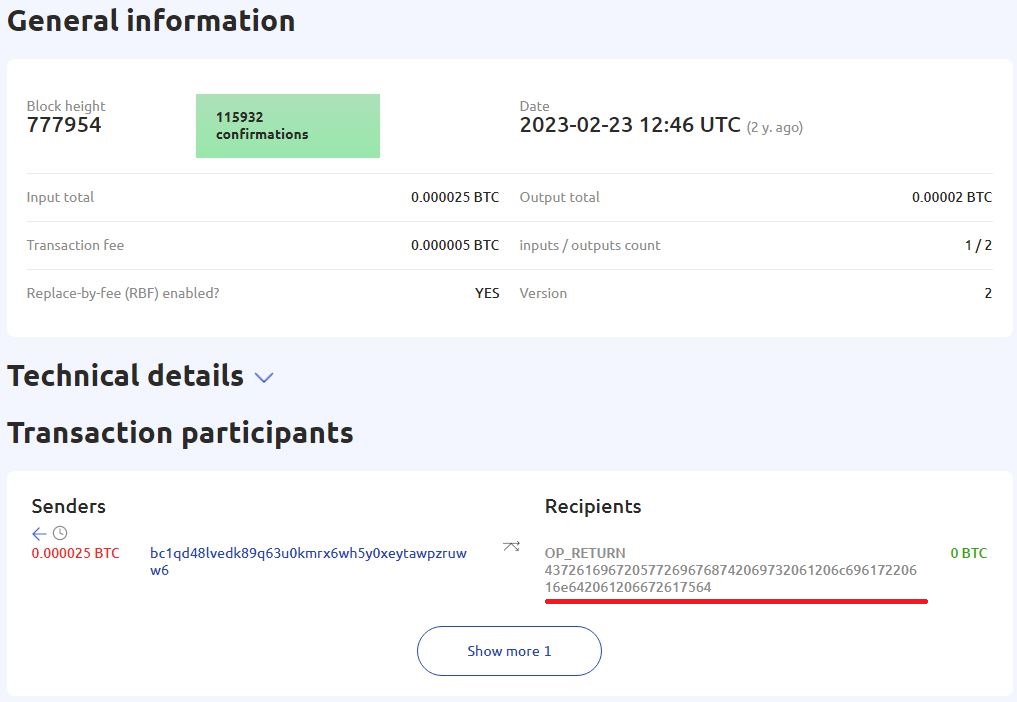
The sent message in the GetBlock blockchain explorer
Sending a message on the Ethereum blockchain
Sending messages on the Ethereum blockchain works the same way as on the bitcoin blockchain. The first thing you need to do is to convert the message into hexadecimal format, and then find a wallet that supports entering additional transaction data. For example, you can use the MyCrypto service. In the transaction setup window, paste the encrypted message into the “Data” field. Note that on the Ethereum network, the message must begin with the instruction “0x”.
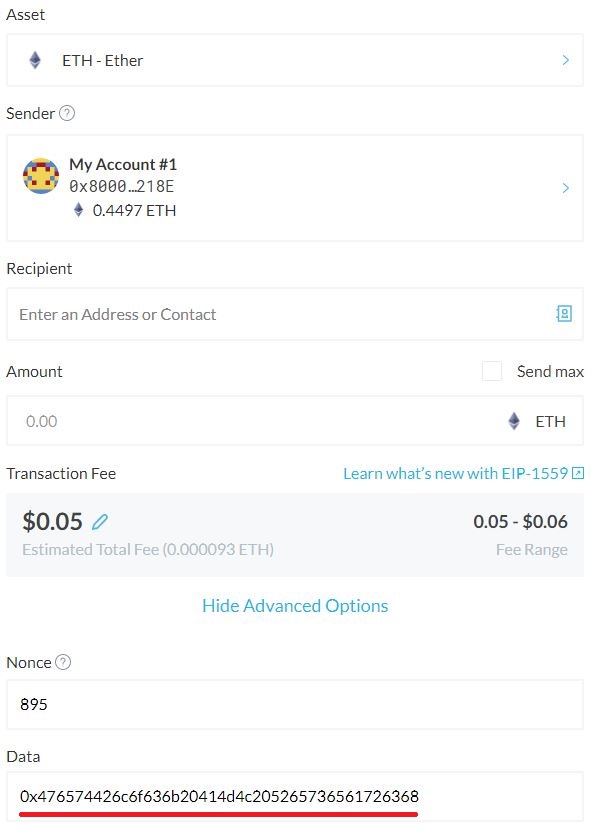
Sending a message on the Ethereum network using the MyCrypto service
There is a simpler way to send messages on the Ethereum network, through a special Input Data Messages (IDM) service. This service allows you to send text messages without encrypting them beforehand. In the Input Data Messages field, you can immediately enter a test message, and then it will be automatically converted into a 16-digit code.
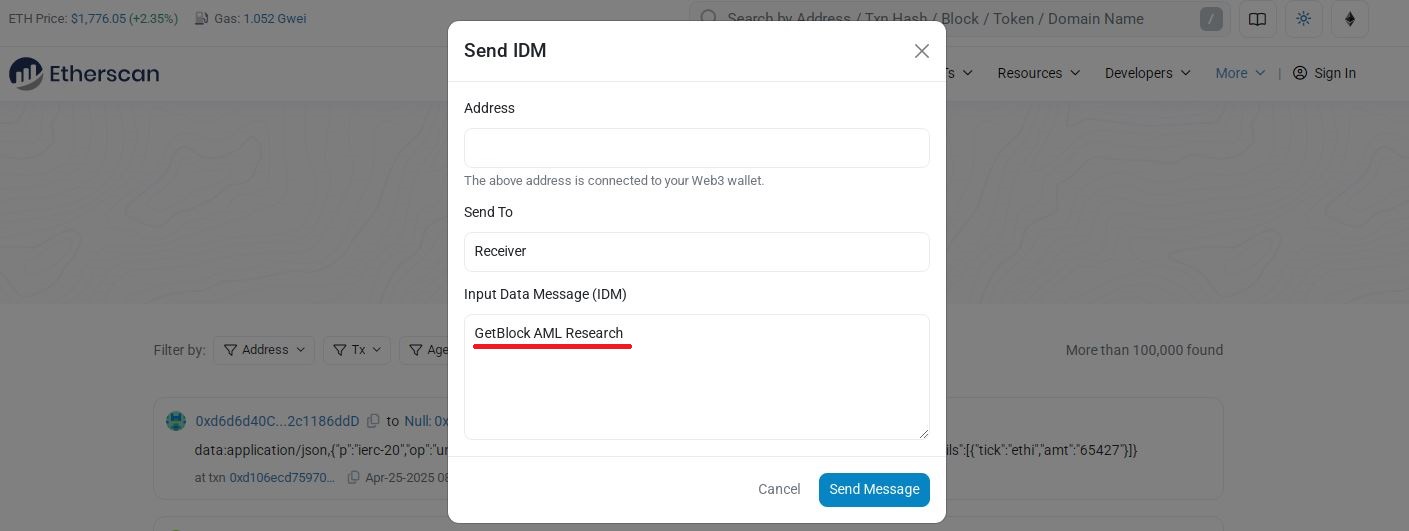
Sending a message on the Ethereum network using IDM
You need to use the appropriate explorer to view messages on the Ethereum network.
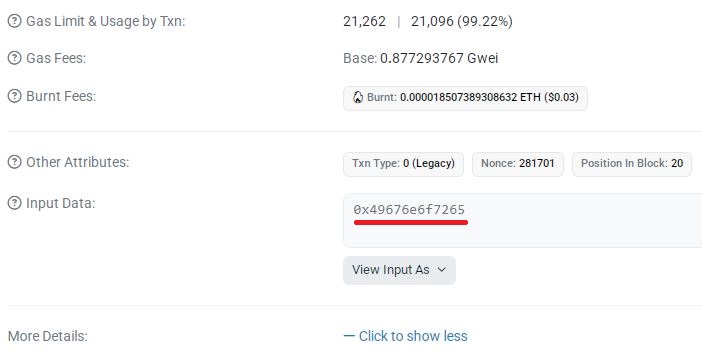
Text message as a 16-digit code in the Etherscan blockchain explorer

Useful material?
 Telegram
  Twitter
 Research
One and the same cryptocurrency address received two completely opposite assessments from different analytics systems: from an ordinary gambling service to an extremely severe criminal offense. This story has become the starting point for a broader conversation about what the scientific standards of blockchain analysis should look like — and why errors in systems like these can shape the fates of real people.
Jul 1, 2026
Research
The blockchain has helped uncover the ties between cryptocurrency fundraising campaigns, exchangers in Syria, and intermediaries in several countries around the world. A telltale pattern has emerged in which the same addresses were used across multiple donation drives at once
Jun 24, 2026
Research
Four Iranian cryptocurrency exchanges accounted for roughly 78% of all digital asset volume tied to the country in 2025. They have now become the focal point of the largest U.S. sanctions campaign against Iran's cryptocurrency infrastructure.
Jun 5, 2026
Research
A financial system is already up and running on public blockchains, with loans, analogues of U.S. Treasuries, and automated capital markets. More than $551 billion has flowed through DeFi protocols — but most of that activity has nothing to do with the real economy and everything to do with the speculative build-up of risk.
May 29, 2026
Research
Around 97% of Chinese suppliers of chemicals used to make fentanyl accept payment in cryptocurrency. The volume of such transactions continues to grow alongside the global market for synthetic drugs
May 22, 2026
Research
For the first time, the new law makes blockchain analytics an officially mandatory tool of financial oversight in the United States. Authorities will also gain the power to restrict transactions with foreign crypto services tied to money-laundering risks.
May 20, 2026
Cryptocurrency rates
-

Bitcoin
$85 616
BTC
-0.38%
-

Ethereum
$2 698.57
ETH
-0.75%
-

BNB Smart Chain
$780.25
BSC
-0.99%
-

Ripple
$1.42
XRP
+1.04%
-

TRON
$0.335571
TRX
-0.23%
-

Zcash
$1 348.15
ZEC
-0.35%
-

Dogecoin
$0.093541
DOGE
-2.56%
-

Cardano
$0.218269
ADA
+2.11%
-

Stellar XLM
$0.184461
XLM
+2.83%
-

Bitcoin Cash
$315.08
BCH
-0.36%